Points
Points are your own channel money. Viewers earn them by watching and chatting, and spend them in your store, on giveaways and on bets. They are Cuebot's own points, not Twitch channel points, and they work on every platform at once.
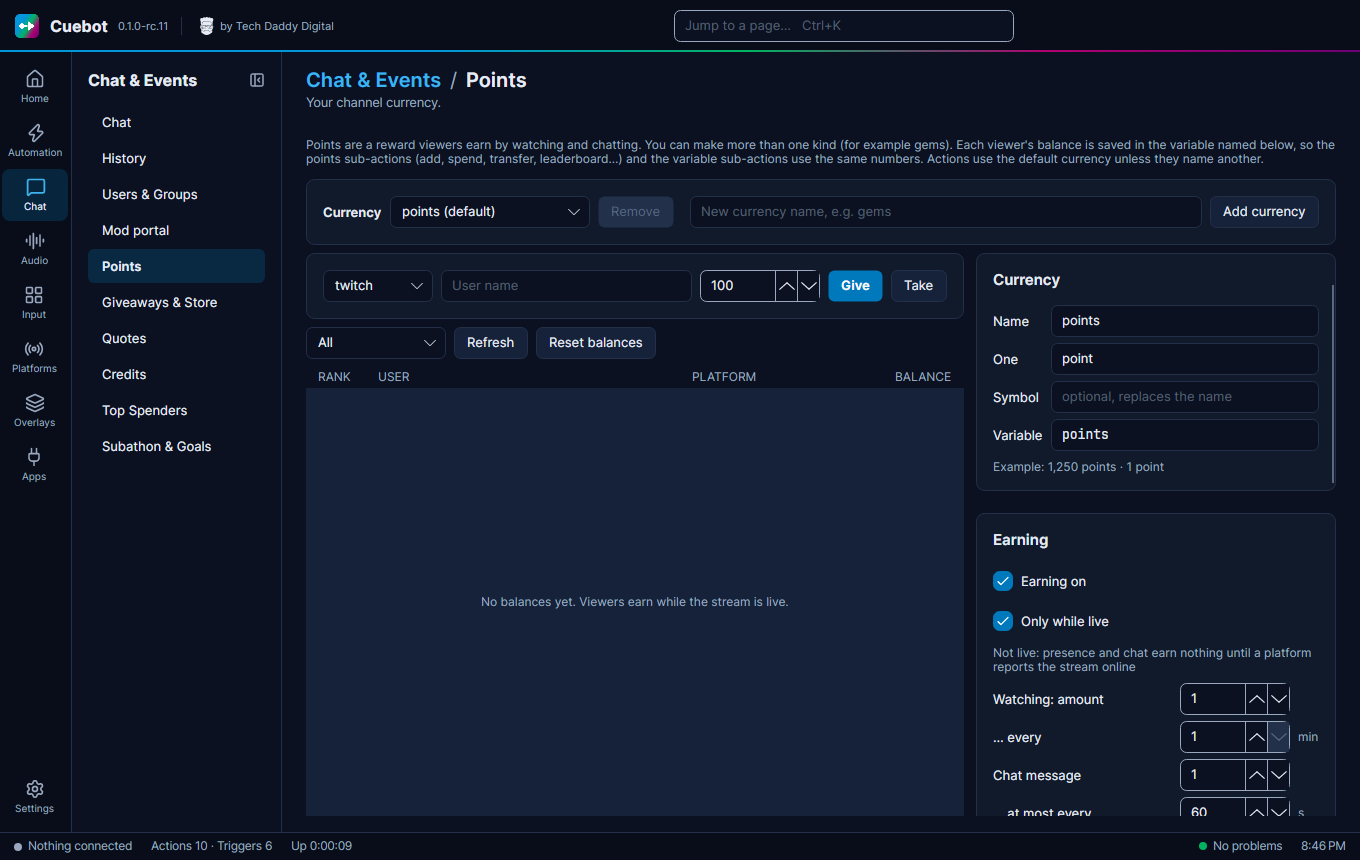
Go to Chat > Points.
How viewers earn points
Under Earning (these are the starting values; change any of them):
| Setting | Starts at | Means |
|---|---|---|
| Earning on | on | Points are handed out at all. |
| Only while live | on | Only while you stream. |
| Watching | 1 every 1 min | Viewers who are watching get 1 point a minute. |
| Chat message | 1, at most every 60 s | Chatting gives a point, but not more than once a minute. |
| Follow bonus | 10 | Extra points for following. |
| Subscription bonus | 100 | Extra points for subscribing. |
| Per gifted sub | 50 | For each sub someone gifts. |
| Raid bonus | 0 | For raiding you. |
| Maximum balance (0 = none) | 0 | The most points one viewer can have. 0 means no limit. |
Multipliers give some viewers more: for example set VIPs to 2 and VIPs earn double. You can also set a
multiplier per group, like Regulars=1.5.
Never earn automatically (bots): list your bots here so they do not collect points.
The name of your money
Under the currency, set Name (like cookies), One (like cookie) and a Symbol. Add currency makes a
second kind of money if you want one.
Giving and taking by hand
Pick the platform, type the User name and an amount, then click Give or Take.
The leaderboard below lists everyone, with Refresh and Reset balances (click twice to be sure).
A !points command
Cuebot does not add chat commands for you. You make them, so you choose the words. For !points:
- Make a
!pointscommand (see Chat commands) and an action with a Command triggered trigger. - Add the Get points sub-action. It looks up the name typed after the command (
!points bob), or the person who typed it when there is no name. Look at its Variables this adds for the next steps to see the name of the balance variable. - Add Send chat message (any platform) that uses that variable, like
%user%, you have ... points!
Other points sub-actions include Add points, Remove points, Transfer points (for a !give bob 50
command) and Get points leaderboard. The trigger Points threshold reached runs when someone reaches an amount
you set under Thresholds.
Spending points
- Giveaways: tickets can cost points.
- The store: viewers buy things you offer.
- Polls and predictions: viewers bet points on what happens next.
Not the same as goal ladder points
A goal ladder counts its own points, from subs, bits, tips and other events. Your viewers' Cuebot points do not go into it.