Users and groups
Cuebot remembers the viewers it has seen. You can sort them into groups, like Regulars or Friends, and then
give a group special rights or more points.
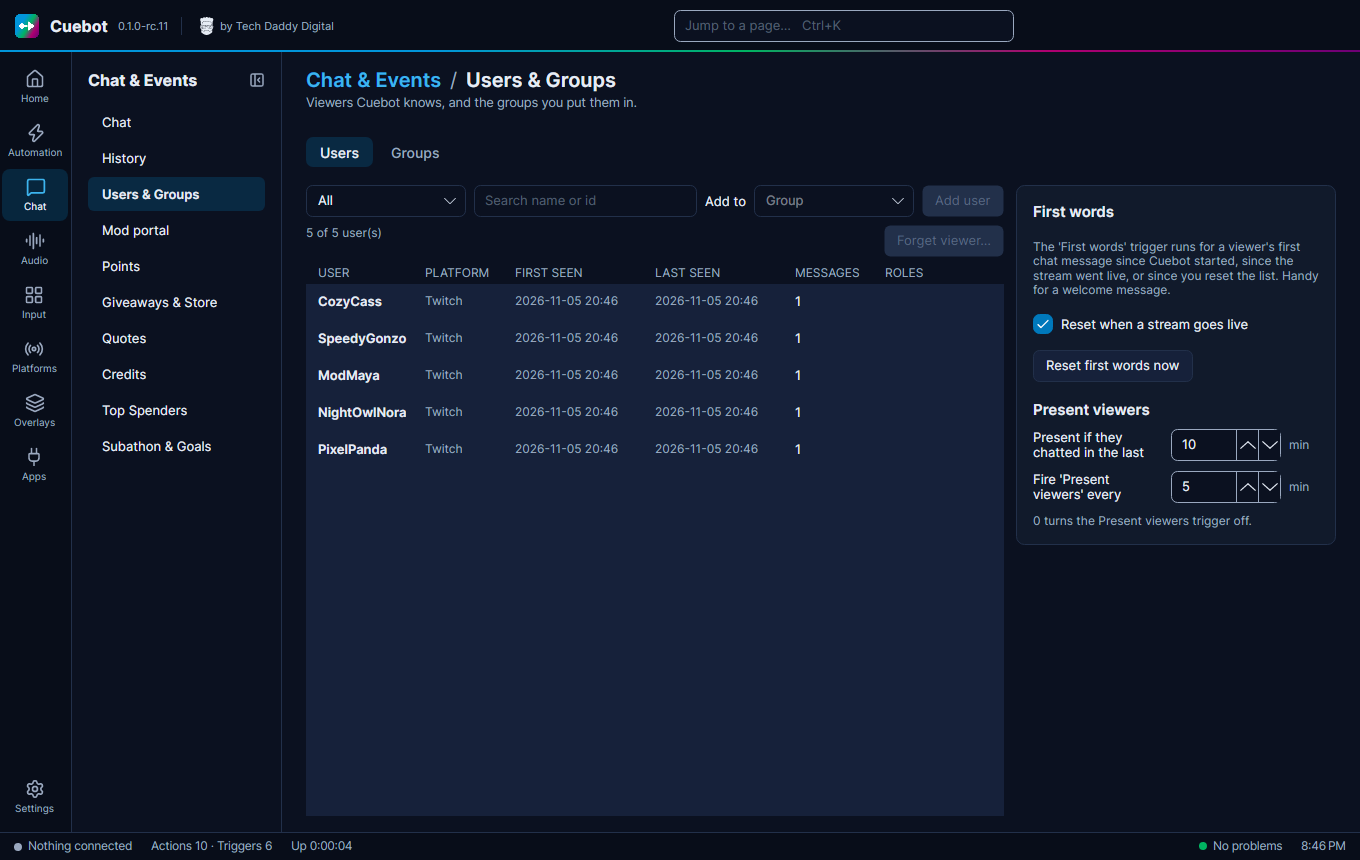
Chat > Users & Groups lists the viewers Cuebot has seen. On the Groups tab you make groups: type a New group name and click Create. Use groups to:
- let only that group use a command (see Chat commands);
- give that group a points multiplier (see Points).
Putting people in a group
On the Users tab, select a viewer, pick the group under Add to and click Add user. Or, on the Groups tab, select the group and type the name under Add a member. Clear members empties a group; Delete group removes it.
Renaming a group
If you rename a group, commands that allow or deny it by name are not updated. Check them on the Commands page.
First words
The First words trigger runs for a viewer's first chat message, handy for a "welcome in!". Tick Reset when a stream goes live so everyone can be welcomed once per stream, or click Reset first words now to start over.
Present viewers
The Present viewers trigger runs every few minutes with everyone who chatted recently, for example to give them points for watching. Set how recently (Present if they chatted in the last … min) and how often (Fire 'Present viewers' every … min; 0 turns it off).
Forgetting a viewer
Forget viewer… deletes everything Cuebot saved about the selected viewer, for example when they ask you to delete their data. Cuebot asks you to confirm first.