Polls and predictions
A poll lets chat vote on a question, like "Which game next?". A prediction lets viewers bet points on what happens, like "Will I beat the boss?". Cuebot can run both in chat on every platform, or use Twitch's own.
On every platform
Go to Overlays > Overlays & Widgets and open Chat poll and prediction (every platform). It runs a poll in chat on every platform at once.
- Poll: type a question and choices, then Start poll. Viewers vote with
!vote 1,!vote 2and so on. End poll finishes it. - Prediction (Cuebot points): type a question and the outcomes, then Start. Viewers bet
points with
!bet 1 500(or!bet 1 all). Click Lock bets when the game starts, then pick the Winner and Pay out. Winners share the whole pot, by how much they bet. Cancel gives everyone their points back.
Both have a time in seconds. 0 keeps voting (or betting) open until you click End poll (or Lock bets).
Show it on stream
Show it with the Poll and prediction widget on your overlay.
Twitch's own polls
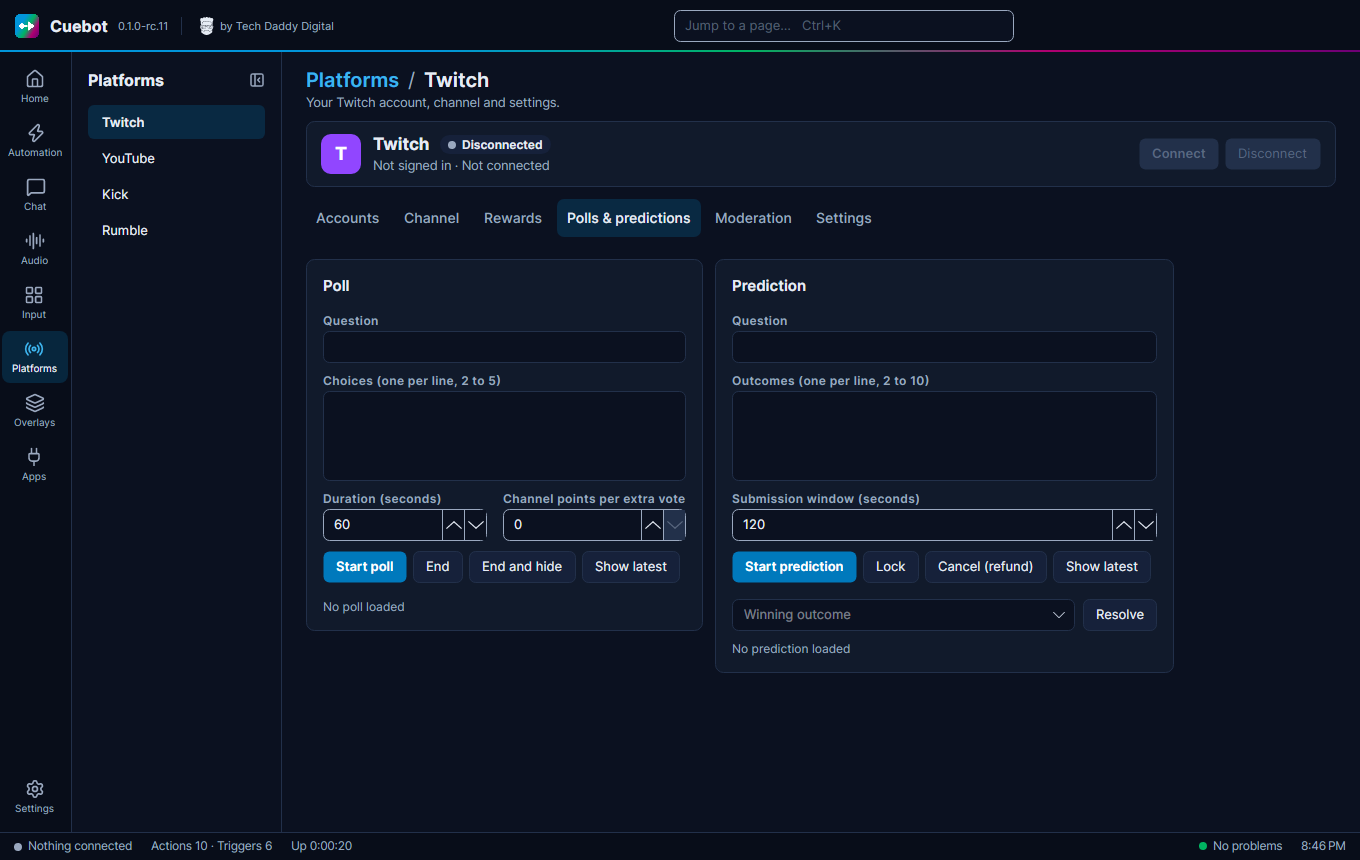
Platforms > Twitch, tab Polls & predictions, uses Twitch's built-in polls and predictions (with Twitch channel points). Fill in Question and the choices (one per line), then Start poll or Start prediction. To finish a prediction, click Lock, type the Winning outcome and click Resolve. Cancel (refund) gives the channel points back.