Words you will see
A small dictionary of the words these guides use. If a word on another page is new to you, look here.
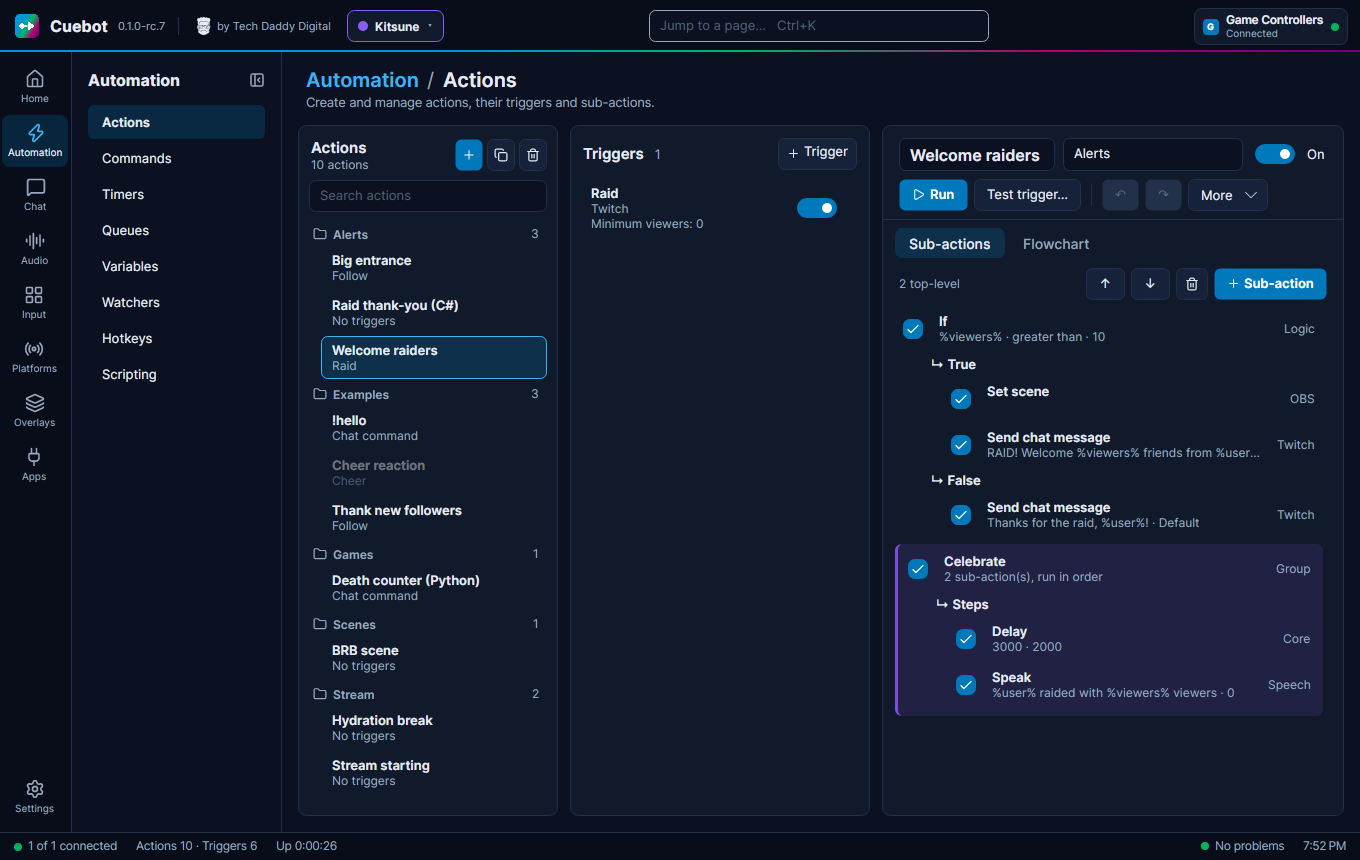
Action: A job for Cuebot, with a name, like "Thank new followers". It is a list of steps (sub-actions). See How actions work.
Alert: A pop-up on your stream when something happens, like a follow. Shown by the Alert box widget. See Alerts.
API: A door that lets one program talk to another. "Cuebot uses the OBS API" means Cuebot talks to OBS through it.
API key, token: A long secret code that proves a program is allowed to use something, a bit like a password. Keep them secret.
Argument: Another name for a variable of the current run, like %user%.
Bot account: An optional second account on a platform, like "MyChannelBot", that writes Cuebot's chat messages for you. See Your platforms.
Branch: One of the lists inside a step like If: the "yes" list or the "no" list. New steps can go into a branch.
Broadcaster account: Your own channel, the one you stream on. Cuebot gets events like follows and raids through it.
Browser source: A source in OBS that shows a web page. Cuebot's overlays are shown this way.
cb: The helper Python code uses, like cb.send_chat("Hi"). Every script function has its own cb method
too, like cb.obs_set_scene("Gameplay"). See Python in detail.
Code step: A Run C# code or Run Python code sub-action: a small program inside an action. See Writing code (C# and Python).
CPH: The toolbox C# code uses, like CPH.SendMessage("Hi"). The same names as in Streamer.bot. See C#
methods.
Command: A word viewers type in chat, usually with a ! in front, like !hello. See Chat
commands.
Cooldown: A wait time before a command can be used again, so it cannot be spammed.
Cron: A short way to write a schedule, with five parts: minute, hour, day, month, weekday. 0 20 * * 5 means
"every Friday at 20:00". Used by timers.
Data folder: The folder where Cuebot keeps all your settings and actions. See Your data and privacy.
Deck: A page of buttons Cuebot shows in a web browser, for your phone or tablet. Not the same as a Stream Deck. See Decks.
Engine: The thing that makes a text-to-speech voice, like Windows voices or ElevenLabs.
Encrypted: Scrambled with a secret key, so that nobody else can read it. Cuebot stores your sign-ins this way.
Export to code: Turns a whole action into one C# or Python script, so you can read or change it as code. See Export to code.
Experimental: Built and checked by Cuebot's own tests, but not yet tried with the real app or service, so it may not work. See What's experimental.
Flowchart: A drawing of an action, with boxes and lines, instead of a list.
Global variable: A value Cuebot remembers between runs, like a death counter. Written with ~ signs: ~deaths~.
See Variables.
Group: Two meanings. A group of actions or commands is a folder that keeps a list tidy. A group of viewers (on Chat > Users & Groups, see Users and groups) is a named list of people, like "Regulars", that you can allow on a command.
Invite: A one-time link (or QR code) that lets a mod join your mod portal with the role you picked.
Lane: One of the lists inside a Run at the same time step. All lanes run at once, and the action carries on when every lane is done. See How actions work.
LAN: Your home network: the computers, phones and tablets connected to your router. "Allow LAN connections" lets those devices reach Cuebot.
MCP: A common way for AI apps to use another program's tools. Lets an AI app work on Cuebot. See AI apps.
Mod portal: A web page (and a tab in the phone app) where your mods help from anywhere, with only the things their role allows. See The mod portal.
Now playing: The song your music player is playing right now. See Now playing.
OSC: A simple language some apps use to send each other short messages, like VRChat and OBSBOT cameras. VMC, used by 3D VTuber apps, is built on it.
Overlay: A see-through layer on top of your stream, like a chat box or alerts. See Overlays.
Pairing: Linking the phone app to your Cuebot once, by scanning the code on Apps > Servers, Pair a phone. See The phone app.
Phone app (Cuebot Companion): Cuebot's app for Android phones and tablets. It shows your decks, a dashboard and your mods' changes. See The phone app.
Platform: A site you stream on: Twitch, YouTube, Kick or Rumble.
Points: Cuebot's own channel money that viewers earn by watching and chatting. See Points.
Queue: A waiting line for actions. A blocking queue runs one action at a time, so alerts do not overlap. See Queues.
Port: A door number. Programs on one computer use different port numbers, so their messages do not get mixed up. Example: OBS listens on port 4455. See Cuebot's servers.
Profile: One persona's whole Cuebot: its own accounts, mods, actions, overlays and viewers. Switch profiles from the top bar. See More than one persona (profiles).
REST API: Cuebot's main door for other programs: web addresses that run actions and change things, with a token. See REST API.
Relay: A small helper on your own free Cloudflare account that passes webhooks on to Cuebot. See Webhooks. The mod portal uses another relay: a shared portal service, so you do not set that one up.
Role: What a mod may do in the mod portal, like run actions or change commands. You pick one for every invite.
Run: One time an action does its job. Every run is listed on Chat > History (see History).
Script function: One of Cuebot's tools for code, with a name like speech.speak. C# and Python can both use
them. In Python each one also has its own cb method, like cb.speech_speak(...). See Script functions.
Scope, permission: What you allow Cuebot to do on a platform, like "read chat" or "change the title". You pick them when you sign in.
Server: Here: a part of Cuebot that other programs can connect to, like the overlay server that OBS uses. See Apps > Servers.
Server-Sent Events: A web address that stays open and sends a message every time something happens. Cuebot's
REST API has one at /events (see REST API).
Signal: A short named message one Cuebot sends to another, like go-live. See Linking two
Cuebots.
Sign-in: Letting Cuebot use your account on a platform. You do it once in your browser, and Cuebot remembers it, locked (encrypted) on your computer.
Slash command: A command people type in Discord that starts with /, like /socials. See Discord
bot.
Song request: A viewer asks for a song in chat, like !sr bohemian rhapsody. See Song
requests.
Subathon timer: A countdown on your stream that subs, bits, tips and other events add time to. See Subathon timers.
Sub-action: One step inside an action, like "send chat message" or "switch scene". Every sub-action is listed in the sub-action reference.
Text-to-speech (TTS): The computer reading text out loud. See Text-to-speech.
Timer: Starts actions on a clock, like every 15 minutes. See Timers.
Top spenders: The viewers who spent the most money (bits, subs, tips and more) this stream, today, this week, month, year or all time. See Top spenders.
Trigger: What starts an action, like "someone followed" or "someone typed !hello". Every trigger is listed in
the trigger reference.
Variable: A word with a value behind it, written in % signs, like %user%. Cuebot swaps it for the real value
when the action runs. See Variables.
VTuber: A streamer who shows an animated avatar instead of their face. See VTuber apps.
Voice alias: A nickname for a voice and its settings, like "Narrator", used by text-to-speech.
Webhook: A small message one web service sends to another when something happens, like a Ko-fi tip.
WebSocket: A line between two programs that stays open, so both can send messages at any time. Streamer.bot tools use one to talk to Cuebot.
Widget: One piece of an overlay, like the chat box, a goal bar or the alert box.